
Do you frequently have so many tabs open in Chrome that you are unable to tell what is loaded in each one?
Are you a user who just can't close a tab because it may be useful later?
Do you frequent see, Mr "Ah, Snap!"?

You, my friend, have a Chrome tab issue!
There's a solution for you, but the
first step to getting the help you need is admitting you have a problem.
I don't have a tab problem!
One of the reasons for a visit from Mr "Ah, Snap!" is running out of enough memory (RAM) to keep up with all tabs open in the browser. Each open tab in Chrome consumes memory. After just a ten tabs (I am trying to cut down), I am already using about 1.2 GB of RAM. When doing research, I frequently have well over 20 tabs open. This leaves few resources for other processes the computer needs to do.
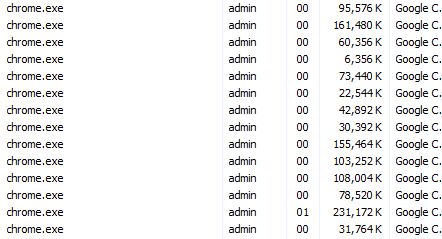
Why does this happen?
Chrome trades memory usage for stability. Each open tab, extension and plug-in is run as a separate process. When a tab or plug-in locks up, users rarely have to restart the entire browser. In most cases, just close the tab and try again. This is especially welcome when one has several tabs open. The downside to this stability is the possibility of using up all the available RAM on tabs leaving little for running other applications. Suddenly you are in "click and wait" territory.
Is there anything I can do (without changing my browsing habits)?
OneTab is a FREE browser extension for Chrome that can help you manage the tab monkey on your back.
OneTab allows users to convert open tabs to single tab with a list of links that can be restored individually or all at once.

After clicking the OneTab icon, my ten tabs were condensed into one tab of links. I am now using under 330 MB. Below shows my one tab, my 5 extensions and my browser itself.

I can quickly relaunch any or all of the tabs I was using, and my computer has more RAM available to run other programs I need. OneTab even allows the import, export and sharing of tab links.
If you find yourself with a slow computer when you have many tabs open, give OneTab a try.

